
Get Fluent Form submissions delivered as CSV
Get Fluent Form submissions
delivered as CSV
Everything you need, nothing you don't
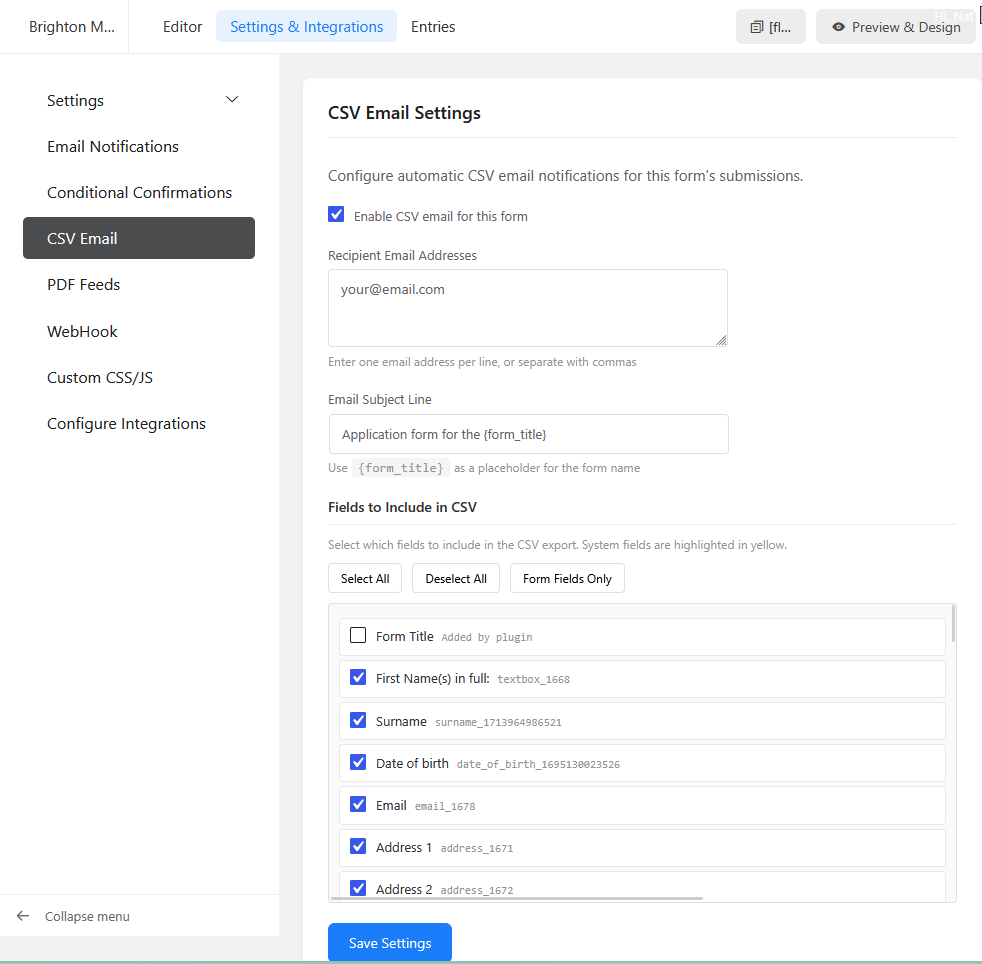
Multiple recipients
Send CSV exports to as many email addresses as you need. Each form can have its own recipient list.
Choose your fields
Select exactly which fields appear in your CSV. System fields are automatically detected and excluded by default.
Repeater field support
Complex repeater fields are automatically flattened into readable columns with proper labelling.
Excel compatible
UTF-8 encoded with BOM for perfect compatibility with Microsoft Excel and Google Sheets.
Per-form settings
Configure each form independently. Different recipients, different fields, different subject lines.
Lightweight and secure
No external services. No tracking. CSV files are generated on submission and deleted after sending.
Up and running in minutes
Install the plugin
Upload to your WordPress plugins folder and activate. Requires Fluent Forms.
Configure each form
Find the CSV Email tab in your form settings. Add recipients and choose fields.
Receive submissions
Every form submission triggers an email with the data as a CSV attachment.
Requirements
- WordPress 5.0 or higher
- Fluent Forms (free or pro)
- PHP 7.4 or higher
- Working wp_mail() configuration
made by Milhouse Designs – Questions? Get in touch